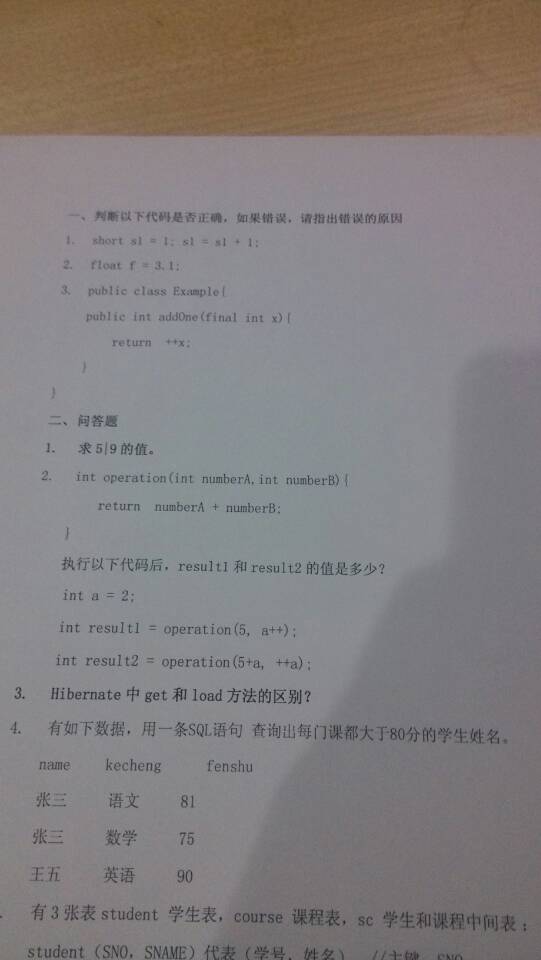
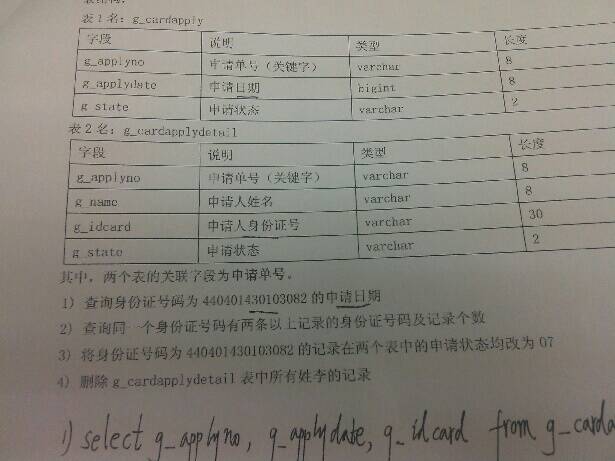
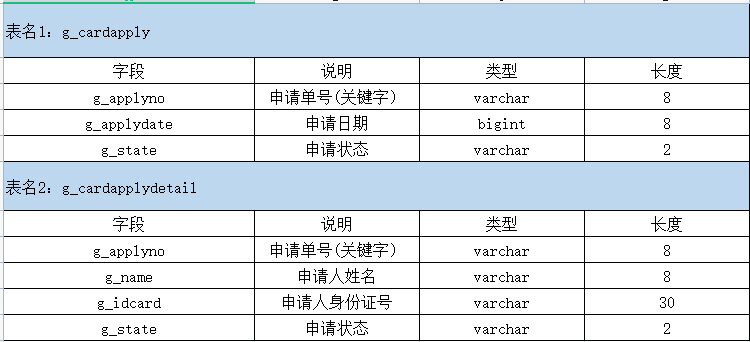
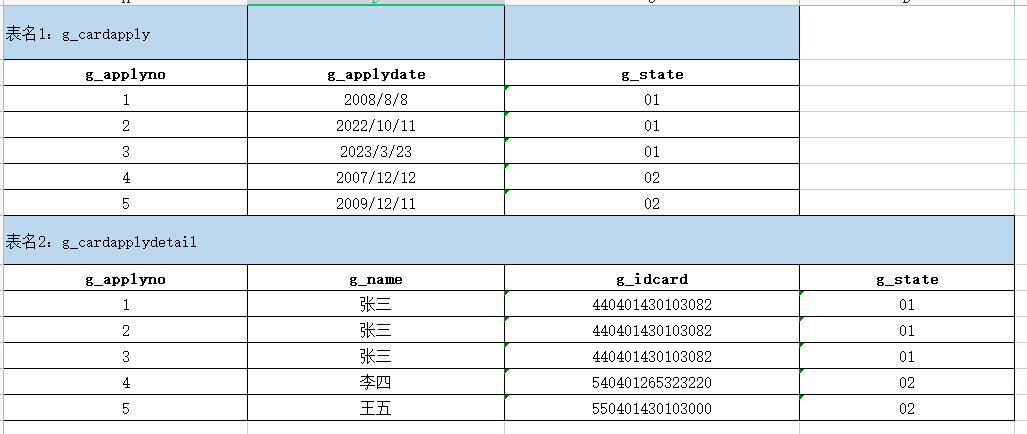
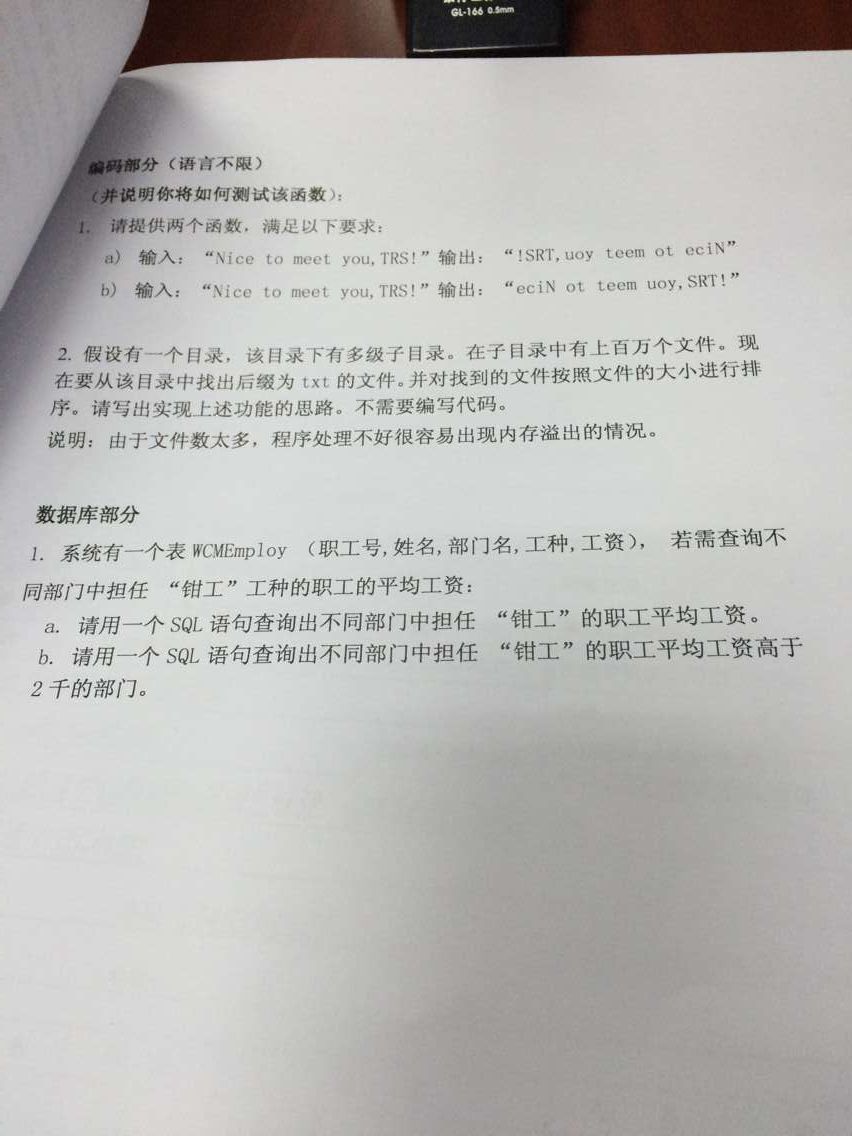
select a.g_applydate from g_cardapply a join g_cardapplydetail b on a.g_applyno = b.g_applyno where b.g_idcard ='440401430103082'
2)查询同一个身份证号码有两条以上记录的身份证号码及记录个数。
1
selectcount(g_idcard),g_idcard from g_cardapplydetail groupby g_idcard havingcount(g_idcard) >=2
3)将身份证号码为440401430103082的记录在两个表中的申请状态均改为07。
1
2
3
4
5
6
7
8
9
10
UPDATE g_cardapply JOIN g_cardapplydetail ON g_cardapply.g_applyno = g_cardapplydetail.g_applyno AND g_cardapplydetail.g_idcard ='440401430103082' SET g_cardapply.g_state ='07', g_cardapplydetail.g_state ='07'
4)删除g_cardapplydetail表中所有姓李的记录。
要注意a表符合姓李的相关日期记录也需要删除
1
delete t1,t2 from g_cardapply t1 join g_cardapplydetail t2 on t1.g_applyno=t2.g_applyno where t2.g_name like'李%';
第三题
1 2 3 4 5 6 7 8 9 10 11 12 13 14
droptable if exists stuscore; create table stuscore( name varchar(255), subject varchar(255), score int, stuid int ); insert into stuscore values('张三','数学',89,1); insert into stuscore values('张三','语文',80,1); insert into stuscore values('张三','英语',70,1); insert into stuscore values('李四','数学',90,2); insert into stuscore values('李四','语文',70,2); insert into stuscore values('李四','英语',80,2); select*from stuscore;
表名:stuscore 1)统计如下:课程不及格[059]的多少个,良[6080]多少个,优[81-100]多少个。 多种方式:可以采用union实现,也可以采用case when then when then else and实现 case把符合的都转换成了字符串,后续可以再用group by进行分组 then是加上条件,as是起名字,count来统计条数,然后再分组
1 2 3 4 5 6
selectcase when score>=0and score<=59then'0-59' when score>=60and score<=80then'60-80' when score>=81and score<=100then'81-100' else'其他'endas score_range, count(*) from stuscore groupby score_range;
2)计算科科及格的人的平均成绩。
1 2 3 4 5 6
select name,avg(score) as avgscore from stuscore where name notin(select name from stuscore where score<60) GROUPBY name;
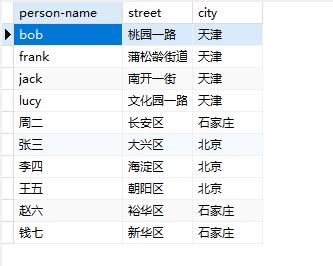
droptable if exists Employee; create table Employee( `person-name` varchar(255) primary key, street varchar(255), city varchar(255) ); insert into Employee values('bob','街道1','天津'); insert into Employee values('frank','街道2','天津'); insert into Employee values('jack','街道3','天津'); insert into Employee values('lucy','街道4','天津'); insert into Employee values('周二','街道5','石家庄'); insert into Employee values('张三','街道6','北京'); insert into Employee values('李四','街道7','北京'); insert into Employee values('王五','街道8','北京'); insert into Employee values('赵六','街道9','石家庄'); insert into Employee values('钱七','街道10','石家庄'); select*from Employee;
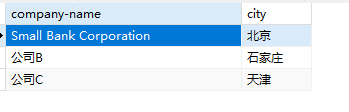
droptable if exists Company; create table Company( `company-name` varchar(255) primary key, city varchar(255) ); insert into Company values('Small Bank Corporation', '北京'); insert into Company values('公司B', '石家庄'); insert into Company values('公司C', '天津'); select*from Company;
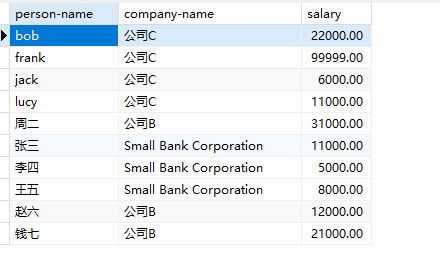
droptable if exists Works; create table Works( `person-name` varchar(255) primary key, `company-name` varchar(255), salary double(10,2) ); insert into Works values('bob','公司C', 22000); insert into Works values('frank','公司C', 99999); insert into Works values('jack','公司C', 6000); insert into Works values('lucy','公司C', 11000); insert into Works values('周二','公司B', 31000); insert into Works values('张三','Small Bank Corporation', 11000); insert into Works values('李四','Small Bank Corporation', 5000); insert into Works values('王五','Small Bank Corporation', 8000); insert into Works values('赵六','公司B', 12000); insert into Works values('钱七','公司B', 21000); select*from Works;
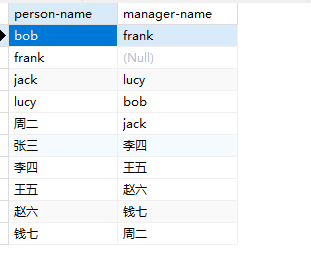
droptable if exists Manages; create table Manages( `person-name` varchar(255) primary key, `manager-name` varchar(255) ); insert into Manages values('bob','frank'); insert into Manages values('frank',NULL); insert into Manages values('jack','lucy'); insert into Manages values('lucy','bob'); insert into Manages values('周二','jack'); insert into Manages values('张三','李四'); insert into Manages values('李四','王五'); insert into Manages values('王五','赵六'); insert into Manages values('赵六','钱七'); insert into Manages values('钱七','周二'); select*from Manages;
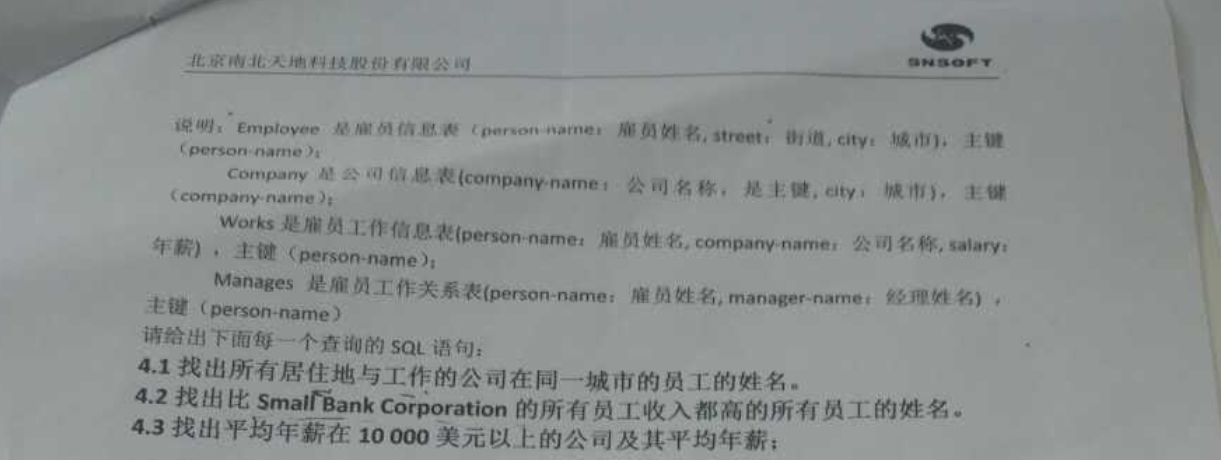
请给出下面每一个查询的SQL语句:
找出所有居住地与工作的公司在同一城市的员工的姓名。
employee e company c works w 将以上三张表进行连接,连接条件: e join w on e.person-name=w.person-name员工表和工作表连接 join c on w.company-name=c.company-name select可以先不写 ,用where进行过滤
1 2 3 4 5
select e.`person-name` from employee e join works w on e.`person-name`=w.`person-name` join company c on w.`company-name`=c.`company-name` where e.city=c.city;
找出比Small Bank Corporation的所有员工收入都高的所有员工的姓名。
1
select `person-name` from works where salary>(selectmax(salary) as maxsal from works where `company-name`='Small Bank Corporation');
找出平均年薪在10000美元以上的公司及其平均年薪。
思路:按照公司进行分组,对年薪求平均值
1
selectavg(salary) avgsal,`company-name` from works groupby `company-name` having avgsal>10000;
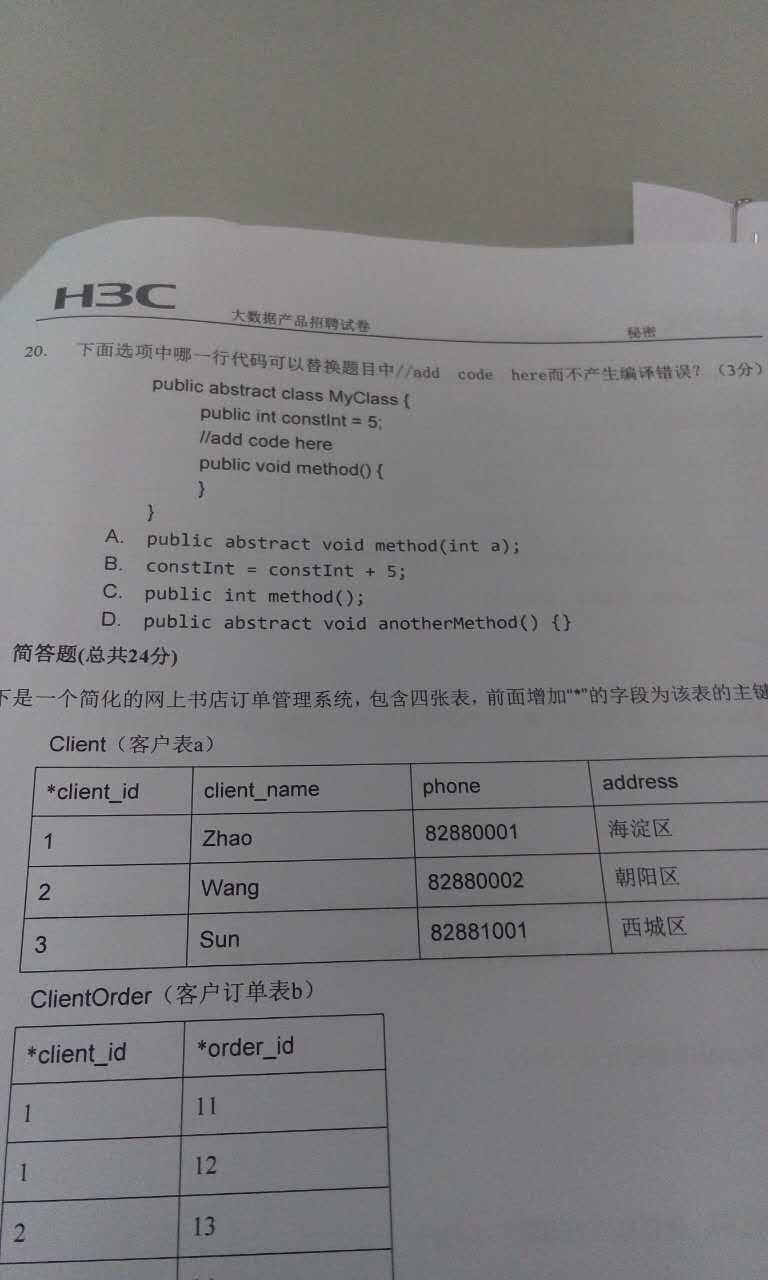
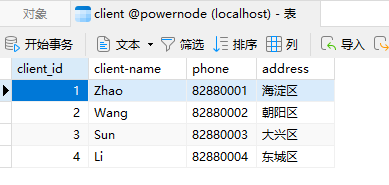
droptable if exists Client; create table Client( client_id int, client_name varchar(255), phone varchar(255), address varchar(255) ); insert into Client values(1,'Zhao', 12522542470, '海淀区'); insert into Client values(2,'Wang', 12522542471, '朝阳区'); insert into Client values(3,'Sun', 12522542472, '大兴区'); insert into Client values(4,'Li', 12522542473, '东城区'); select*from Client;
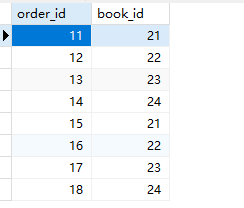
droptable if exists `Order`; create table `Order`( order_id int, book_id int ); insert into `Order` values(11,21); insert into `Order` values(12,22); insert into `Order` values(13,23); insert into `Order` values(14,24); insert into `Order` values(15,21); insert into `Order` values(16,22); insert into `Order` values(17,23); insert into `Order` values(18,24); select*from `Order`;
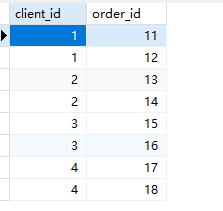
droptable if exists ClientOrder; create table ClientOrder( client_id int, order_id int ); insert into ClientOrder values(1,11); insert into ClientOrder values(1,12); insert into ClientOrder values(2,13); insert into ClientOrder values(2,14); insert into ClientOrder values(3,15); insert into ClientOrder values(3,16); insert into ClientOrder values(4,17); insert into ClientOrder values(4,18); select*from ClientOrder;
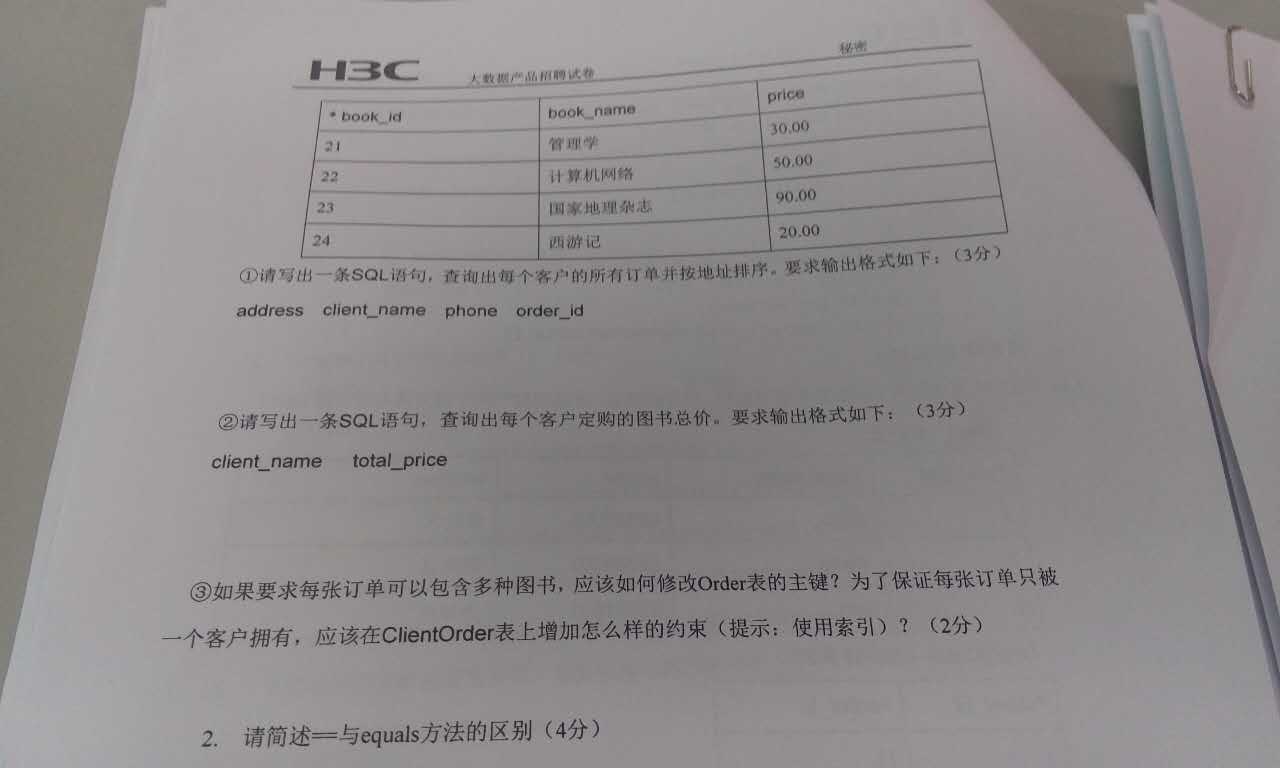
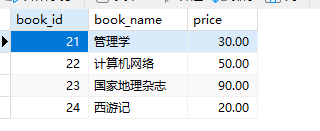
droptable if exists Book; create table Book( book_id int, book_name varchar(255), price double(10,2) ); insert into Book values(21, '管理学', 30); insert into Book values(22, '计算机网络', 50); insert into Book values(23, '国家地理杂志', 90); insert into Book values(24, '西游记', 20); select*from Book;
select c.client_name,sum(b.price) as total_price from client c join clientorder co on c.client_id=co.client_id join `order` o on co.order_id=o.order_id join book b on o.book_id=b.book_id groupby c.client_name;
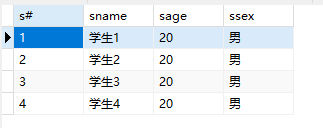
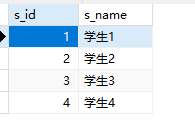
droptable if exists student; create table student( `s#` int, sname varchar(255), sage int, ssex char(1) ); insert into student values(1,'学生1', 20, '男'); insert into student values(2,'学生2', 20, '男'); insert into student values(3,'学生3', 20, '男'); insert into student values(4,'学生4', 20, '男'); select*from student;
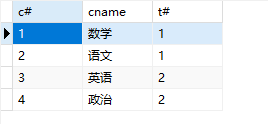
droptable if exists course; create table course( `c#` int, cname varchar(255), `t#` int ); insert into course values(1,'数学',1); insert into course values(2,'语文',1); insert into course values(3,'英语',2); insert into course values(4,'政治',2); select*from course;
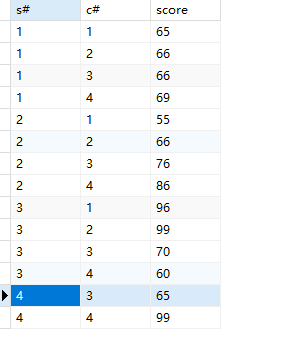
droptable if exists sc; create table sc( `s#` int, `c#` int, score int ); insert into sc values(1,1,65); insert into sc values(1,2,66); insert into sc values(1,3,66); insert into sc values(1,4,69); insert into sc values(2,1,55); insert into sc values(2,2,66); insert into sc values(2,3,75); insert into sc values(2,4,86); insert into sc values(3,1,96); insert into sc values(3,2,99); insert into sc values(3,3,70); insert into sc values(3,4,60); insert into sc values(4,3,65); insert into sc values(4,4,99); select*from sc;
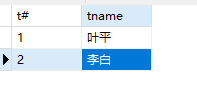
droptable if exists teacher; create table teacher( `t#` int, tname varchar(255) ); insert into teacher values(1,'叶平'); insert into teacher values(2,'李白'); select*from teacher;
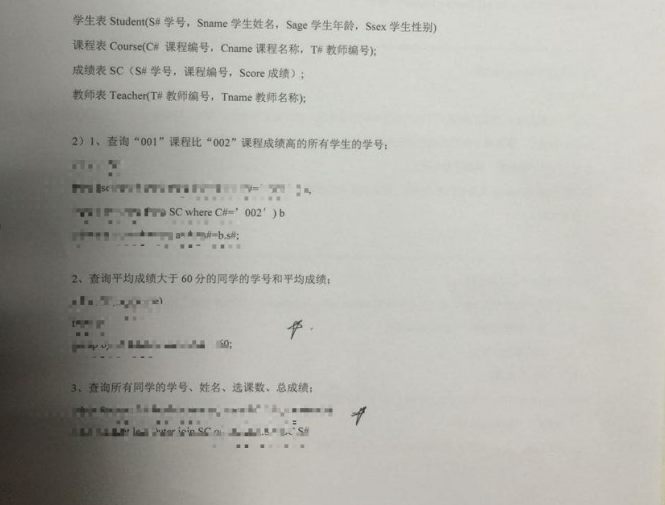
查询1号课比2号课成绩高的所有学生学号。
主要是c#,查询出1号和2号课的学生后,要确定两表的s#是一样的,才是同一个人,然后去对比 select * from sc where c#=1; select * from sc where c#=2;
1 2 3 4
select a.`s#` from (select*from sc where `c#`=1) a join (select*from sc where `c#`=2) b on a.`s#`=b.`s#` where a.score>b.score;
查询平均成绩大于60分的学号和平均成绩。
1
select `s#`,avg(score) from sc groupby `s#` havingavg(score) >60;
查询所有学生学号、姓名、选课数、总成绩。
求选课数就是count,总成绩sum,联合分组后才可以一起显示学号姓名
1 2
select s.`s#`,s.sname,count(sc.`c#`),sum(sc.score) from student s join sc on s.`s#`=sc.`s#` groupby s.`s#`,s.sname;
查询姓“李”的老师的个数。
count(tname)记录不为null的个数
1
selectcount(tname) from teacher where tname like'李%';
查询没学过“叶平”老师课的学号、姓名。
select t# from teacher where tname=’叶平’这是叶平老师的编号 select c# from course where t#=(上面)这是查叶平老师的课的编号 select distinct s# from sc where c# in(上面),c#是查询的字段,in就是要查询的内容
1
select*from student where `s#` notin(selectdistinct `s#` from sc where `c#` in(select `c#` from course where `t#`=(select `t#` from teacher where tname='叶平')));
第八题
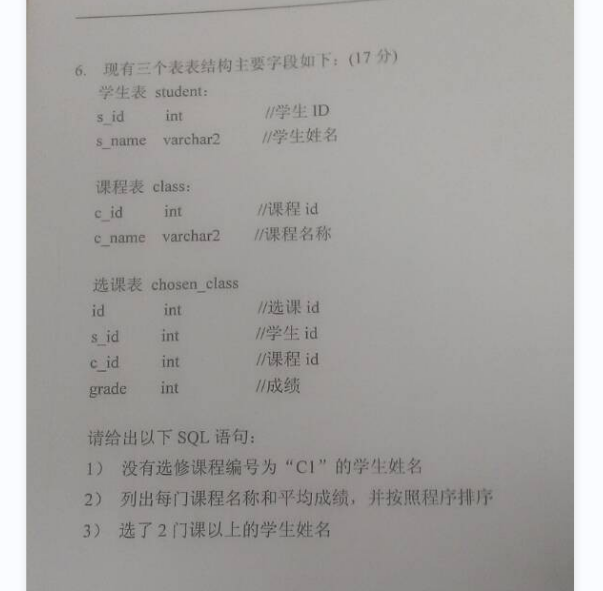
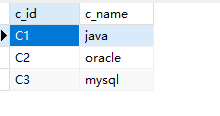
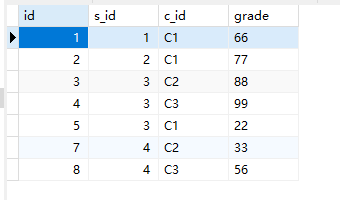
学生表:student 课程表:class 选课表:chosen_class
1
没有选修课程编号为C1的学生姓名
select s_id from chosen_class where c_id=’c1’;选择了的 select s_id from chosen_class where s_id not in(没选择的
1 2
select sname from student where s_id in(select s_id from chosen_class where s_id notin(select s_id from chosen_class where c_id='c1'));
列出每门课程名称和平均成绩,并按照成绩排序
class c chosen_class cc c.c_id=cc.c_id
1
select c.c_name,avg(cc.grade) as avgscore from `class` c join chosen_class cc on c.c_id=cc.c_id groupby c.c_name orderby avgscore;
选了2门课以上的学生姓名。
思路:按照学生姓名分组,计数 student s chosen_class cc 条件:s.s_id=cc.s_id
1
select s.sname,count(c_id) from student s join chosen_class cc on s.s_id=cc.s_id groupby s.sname havingcount(c_id) >2;
第九题
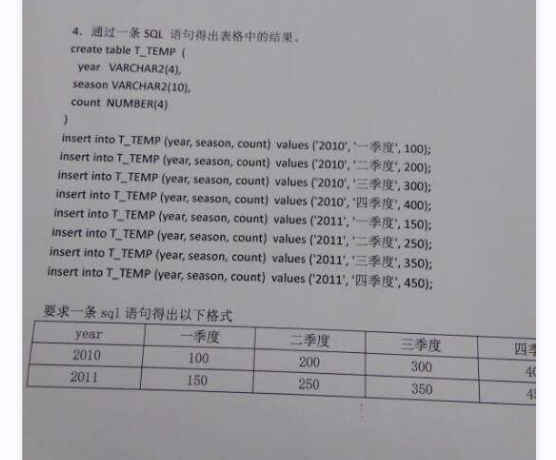
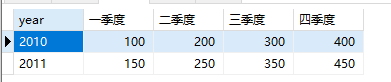
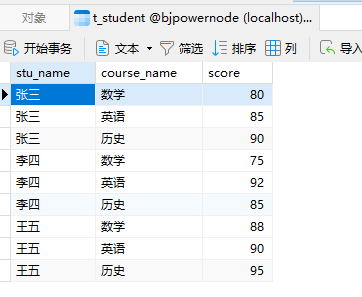
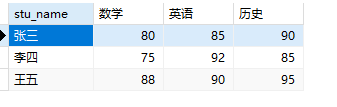
要转换成:
1 2 3 4 5 6 7 8 9 10 11 12 13 14 15 16 17 18
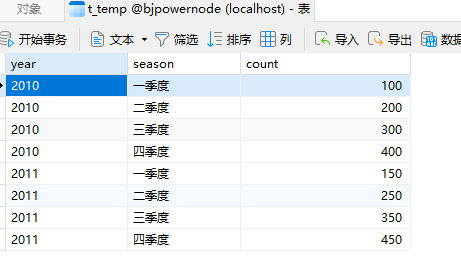
/* 第九题 */ droptable if exists t_temp; create table t_temp( yearint, season varchar(255), count int ); insert into t_temp values(2010,'一季度',100); insert into t_temp values(2010,'二季度',200); insert into t_temp values(2010,'三季度',300); insert into t_temp values(2010,'四季度',400); insert into t_temp values(2011,'一季度',150); insert into t_temp values(2011,'二季度',250); insert into t_temp values(2011,'三季度',350); insert into t_temp values(2011,'四季度',450); select*from t_temp;
select year, max(case season when'一季度'then count else0end) as'一季度', max(case season when'二季度'then count else0end) as'二季度', max(case season when'三季度'then count else0end) as'三季度', max(case season when'四季度'then count else0end) as'四季度' from t_temp groupby year;
第十题
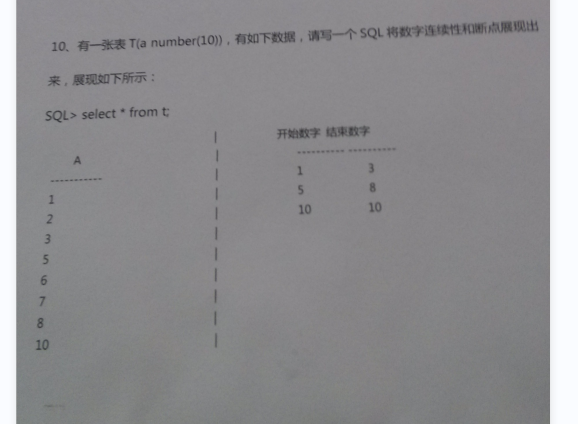
建表
1 2 3 4 5 6 7 8 9 10 11 12 13
droptable if exists t; create table t( A int ); insert into t values(1); insert into t values(2); insert into t values(3); insert into t values(5); insert into t values(6); insert into t values(7); insert into t values(8); insert into t values(10); select*from t;
select a,(lag(a) over(orderby a)) as per_a from t; /* 将以上sql语句执行结果当做临时表m,上面的表对比a可以发现规律 筛选条件:m.a-m.per_a <> 1 or m.pre_a is null 执行完就是左边的a表为135,右表可以先用row_number生成123 */ select m.a,row_number() over(orderby m.a)as rownum from (select a,(lag(a) over(orderby a)) as per_a from t) m where m.a-m.per_a <>1or m.per_a isnull;
select a,(lead(a) over(orderby a)) as pre_a from t; /* 将以上sql查询结果当做临时表n,这个规律可以借鉴上面的,后减前 筛选条件:n.pre_a - n.a <> 1 or n.pre_a is null */ select n.a,row_number() over(orderby n.a) as rownum from (select a,(lead(a) over(orderby a)) as pre_a from t) n where n.pre_a - n.a <>1or n.pre_a isnull;
/* 将以上两个最终的查询结果看做两张表:x和y 连接条件:x.rownum=y.rownum */ select x.a as 开始数字,y.a as 结束数字 from (select m.a,row_number() over(orderby m.a)as rownum from (select a,(lag(a) over(orderby a)) as per_a from t) m where m.a-m.per_a <>1or m.per_a isnull) x join (select n.a,row_number() over(orderby n.a) as rownum from (select a,(lead(a) over(orderby a)) as pre_a from t) n where n.pre_a - n.a <>1or n.pre_a isnull) y on x.rownum=y.rownum;
解答上面这个题目需要具备以下知识点:
lag函数
lead函数
row_number函数
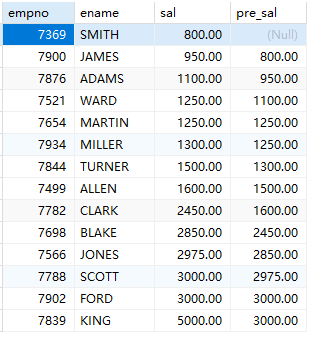
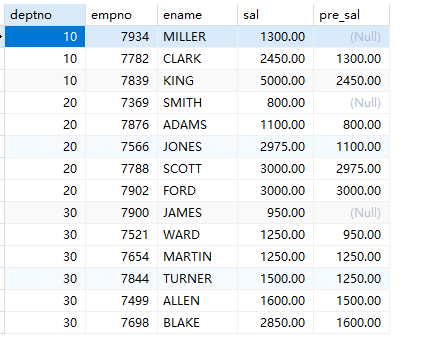
lag函数:获取当前行的上一行数据
1
select empno,ename,sal,(lag(sal) over(orderby sal asc)) as pre_sal from emp;
注意:over函数用来指定“在…..范围内”,通常和lag函数联用。
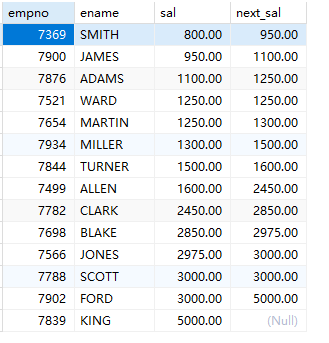
lead函数:获取当前行的下一行数据
1
select empno,ename,sal,(lead(sal) over(orderby sal asc)) as next_sal from emp;
注意:over函数用来指定“在…..范围内”,通常和lead函数联用。
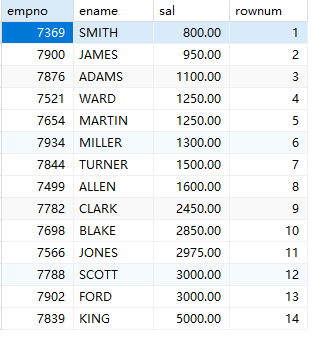
row_number函数:可以为查询结果集生成行号:
1
select empno,ename,sal,row_number() over(orderby sal) as rownum from emp;
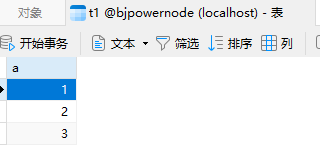
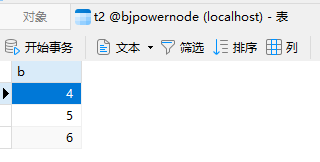
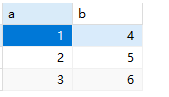
利用row_number函数,将两个不相关的列拼接在一起显示:
1 2 3 4 5 6 7 8
select x.a, y.b from (select a,row_number() over(orderby a) as rownum from t1) x join (select b,row_number() over(orderby b) as rownum from t2) y on x.rownum = y.rownum;
-- 查询每个部门平均工资的工资等级 -- 第一种写法 select t.deptno,t.avgsal,s.grade from (select deptno,avg(sal) as avgsal from emp groupby deptno) t join salgrade s on t.avgsal between s.losal and s.hisal;
-- 第二种写法:使用CTE语法 with cte_exp as(select deptno,avg(sal) as avgsal from emp groupby deptno) select cte_exp.deptno,cte_exp.avgsal,s.grade from cte_exp join salgrade s on cte_exp.avgsal between s.losal and s.hisal;